Hellblade: Senua's Sacrifice Free Download

Hellblade: Senua's Sacrifice Direct Download

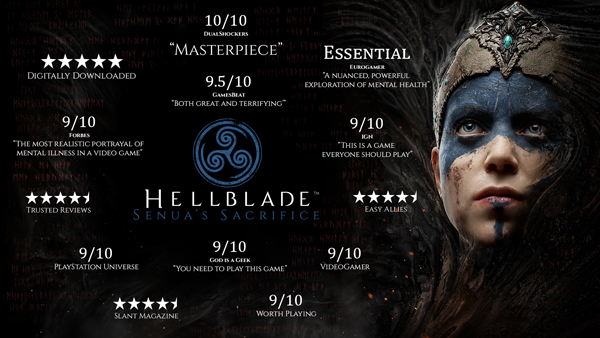
From the makers of Heavenly Sword, Enslaved: Odyssey to the West, and DmC: Devil May Cry, comes a warrior’s brutal journey into myth and madness.
2021 Update:
Return to Helheim and experience Senua’s world through new eyes with enriched visuals and new features. Upgraded materials, particles and LOD, DirectX Raytracing and optimised performance with NVIDIA DLSS and AMD FSR support. We have also used this opportunity to include some key accessibility improvements, including full controller remapping and colour blindness settings.
Set in the Viking age, a broken Celtic warrior embarks on a haunting vision quest into Viking Hell to fight for the soul of her dead lover.
Created in collaboration with neuroscientists and people who experience psychosis, Hellblade: Senua’s Sacrifice will pull you deep into Senua’s mind.

Accessibility Features:
GAMEPLAY
- Accessibility options available on launch within the first-boot options menu.
- Adjustable combat difficulty between dynamically-adjusted 'Auto' mode, or manually-selected 'Easy', 'Medium', or 'Hard' modes.
- Game can be paused both during gameplay and cinematics.
AUDIO
- Custom volume controls can be adjusted for Master, Music, SFX, Voices, and Menu audio.
- Audio output can be adjusted between Stereo and Mono sound modes.
VISUAL
- Color blind modes, and correction intensities can be adjusted for the included Deuteranopia, Protanopia, and Tritanopia filters.
- Subtitles for spoken content can be set to On or Off.
- Subtitle text size can be adjusted between 'Standard' or 'Large'.
- Subtitle text color can be adjusted between White, Orange, Green, or Blue.
- Subtitle backgrounds can be adjusted between Transparent or 'Solid' black.
- Text contrast for menu backgrounds can be adjusted between 'Half-Transparent' or 'Solid' black.
INPUT
- Adjustable input sensitivity for controller joystick and mouse axes, and ability to invert camera axis.
- Input remapping for keyboard keys and controller buttons (camera control and menu navigation keys excluded).
- Full keyboard support allowing the game to be entirely played with a keyboard (arrow keys replace mouse/right stick movement).
- Controller vibration can be set to On or Off.
- Running modifier can be set to be activated on key/button Toggle or Hold.
Note that the listed accessibility options apply to the Hellblade: Senua's Sacrifice Enhanced on PC version of the game.
How to Download Hellblade: Senua's Sacrifice Directly
1. Click the download button to start.
2. When the download is complete, right-click the .rar file and select 'Extract to current folder'.(If you run into any errors while extracting, make sure you’re using WinRAR or 7-Zip.)
3. Open the unzipped folder, find the .exe file, and double click it to run. (If there's a _readme.txt in the folder, it's probably worth checking out.)
4. Enjoy. If you get any missing .dll errors, check for a 'Redist' or '_CommonRedist' folder and install everything inside.